How to play Bridges
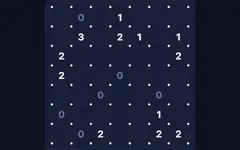
Each circle is an island. Connect them with bridges so that:
- the number of bridges touching an island equals its number;
- bridges run straight (horizontally or vertically) and never cross other bridges or islands;
- any two islands are joined by at most two bridges;
- all islands end up connected into one group.
Controls
- Drag from one island towards a neighbour to add a bridge (a second drag makes it double, a third removes it).
- Or tap the empty gap between two islands to cycle 0 → 1 → 2 → 0 bridges. Right-click or long-press cycles backwards.
- Ctrl+Z undoes. Check highlights wrong bridges, Hint fixes one bridge.
Completed islands turn green, over-full islands turn red. Every puzzle has exactly one solution.
Tips
An island showing 8 needs double bridges in all four directions; a corner 4 or an edge 6 is just as forced. A 1 next to another 1 can never join it (they would form a closed group).
About this hashi puzzle
Connect islands with bridges matching their numbers. Play Bridges free in your browser on desktop, tablet or phone. It works offline once loaded — perfect for travel. Your progress and best scores are saved on your device. Popular searches: bridges puzzle.
Bridges FAQ
Is Bridges free to play?
Yes. Bridges is completely free on GamesVora. There is nothing to download or install and you don't need an account.
Can I play Bridges offline?
Yes. Once you have opened GamesVora while online, Bridges is saved on your device and you can keep playing without an internet connection.
Does Bridges work on mobile phones and tablets?
Yes. Bridges works in any modern browser on Android phones, iPhones, iPads, tablets, laptops and desktop computers, with touch, mouse and keyboard controls.
Is my progress saved?
Your settings, best scores and statistics are saved in your browser on this device. Clearing your browser data will reset them.
What other games are like Bridges?
If you enjoy Bridges, try the other games in our Logic Puzzles collection — they are all free and work offline too.